protobuf协议
Protobuf
Protobuf 提供了一种紧凑的二进制格式,序列化后的数据体积小,解析速度快,适合高性能场景。它支持多种编程语言,包括 C++、Java、Python、Go 等,能够实现跨语言的数据交换。
Protobuf 常用于以下场景:
分布式系统:在服务之间传递高效的结构化数据。
RPC 框架:与 gRPC 集成,用于定义服务接口和消息格式。
数据存储:用于存储需要高效读取和写入的结构化数据。
三种序列化协议的差异
| XML | JSON | Protobuf | |
|---|---|---|---|
| 数据存储 | 文本 | 文本 | 二进制 |
| 序列化存储消耗 | 大 | 较大 | 小(XML的1/3~1/10) |
| 序列化/反序列化速度 | 慢 | 慢 | 快(XML的20-100倍) |
| 数据类型 | 支持广泛的数据类型 | 支持基本的数据类型 | 需要通过message定义来指定数据类型 |
| 跨平台支持 | 支持 | 支持 | 支持 |
再来看一个小例子。我们需要传输一个结构体类型的数据,结构体如下:
1
2
3
4
struct Student {
	int id;
	std::string name;
}
使用XML序列化:
1
2
3
4
 <student>
   <id>101</id>
   <name>hello</name>
 </student>
使用json序列化:
1
2
3
4
 {
  "id": 101,
  "name": "hello"
 }
使用Protobuf二进制序列化:
1
 08 65 12 06 48 65 6C 6C 6F 77
语法
message 的定义语法:
1
2
3
4
5
<comment>
message  <message_name> {
  <filed_rule>  <filed_type> <filed_name> = <field_number>
       规则          类型          名称           编号
}
- comment: 注射 /* */或者 //
- message_name: 同一个pkg内,必须唯一
- filed_rule: 可以没有, 常用的有repeated, oneof
- filed_type: 数据类型, protobuf定义的数据类型, 生产代码的会映射成对应语言的数据类型
- filed_name: 字段名称, 同一个message 内必须唯一
- field_number: 字段的编号, 序列化成二进制数据时的字段编号
字段编号规则
- 必须为正整数,范围
1 ~ 2^29-1(19000~19999保留给 protobuf 实现)。 - 不能重复,不能随意变更(已上线字段只能 deprecate / reserve)。
- 可以乱序
- 1-15 占 1 byte,16-2047占 2 byte;高频字段尽量用 1-15。
示例
1
2
3
4
5
message Demo {
  int32 a = 9;
  int32 b = 2;   // 编号 2 比 9 小,完全 OK
  int32 c = 200; // 跳得再大也没问题
}
值类型
消息字段可以具有以下类型之一:
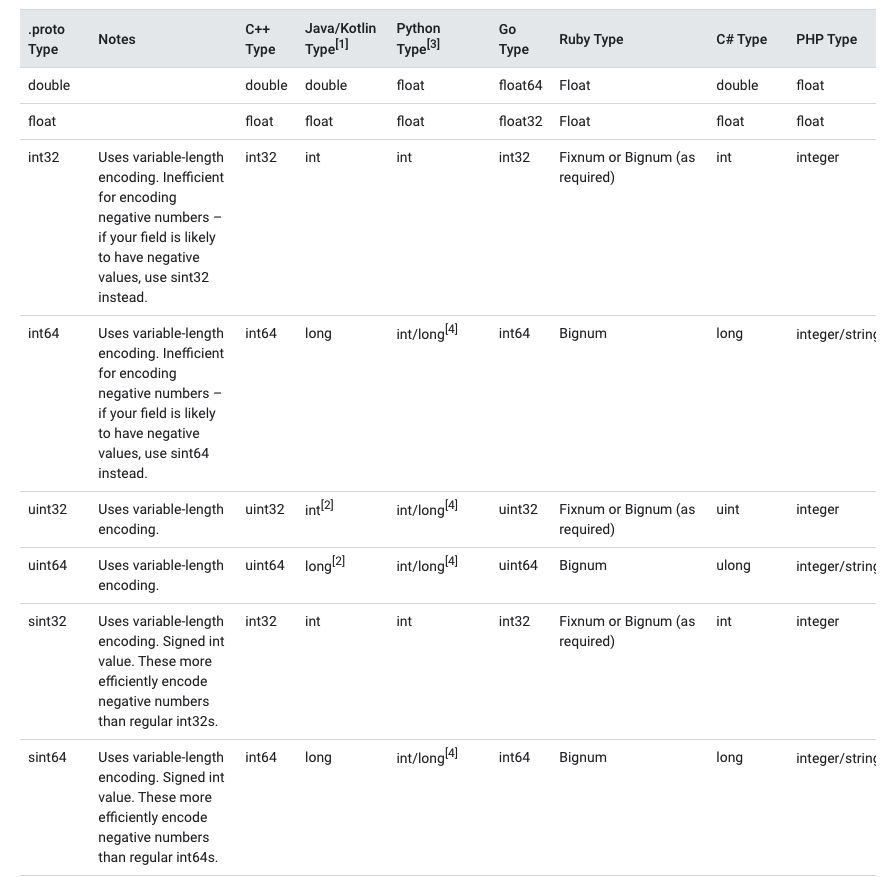
示例
1
2
3
4
5
6
7
8
message ActionInfo {
  // 当前毫秒时间戳
  int64 timestamp = 0;
  // 内部生成的 ID
  string action_id = 1;
  // 是否只能客户端发送
  bool only_client = 2;
}
枚举类型
枚举声明语法:
1
2
3
enum <enum_name> {
    <element_name> = <element_number>
}
- enum_name: 枚举名称
- element_name: pkg内全局唯一, 很重要
- element_number: 必须从0开始, 0表示类型的默认值, 32-bit integer
示例
1
2
3
4
5
6
7
8
9
enum Corpus {
    UNIVERSAL = 0;
    WEB = 1;
    IMAGES = 2;
    LOCAL = 3;
    NEWS = 4;
    PRODUCTS = 5;
    VIDEO = 6;
}
别名
如果的确有2个同名的枚举需求: 比如 TaskStatus 和 PipelineStatus 都需要Running,就可以添加一个: option allow_alias = true;
1
2
3
4
5
6
7
8
9
10
11
12
13
14
15
message MyMessage1 {
  enum EnumAllowingAlias {
    option allow_alias = true;
    UNKNOWN = 0;
    STARTED = 1;
    RUNNING = 1;
  }
}
message MyMessage2 {
  enum EnumNotAllowingAlias {
    UNKNOWN = 0;
    STARTED = 1;
    // RUNNING = 1;  // Uncommenting this line will cause a compile error inside Google and a warning message outside.
  }
}
预留值
可以使用max关键字指定保留的数值范围达到最大可能值。
1
2
3
4
5
6
7
8
enum Foo {
  UNIVERSAL = 0;
  WEB = 1;
  // IMAGES = 2; //Enum value 'IMAGES' uses reserved number 2
  YOUTUBE = 3;
  reserved 2, 15, 9 to 11, 40 to max;
  reserved "FOO", "BAR";
}
数组类型
1
2
3
4
5
6
7
8
9
10
11
12
13
14
15
16
17
18
19
20
21
message  Result {
  int32 age = 1;
  string name = 2;
}

message SearchResponse {
  repeated Result result = 1;  // 数组
}

// protoc -I=./ --go_out=./pbrpc/service --go_opt=module="github.com/ProtoDemo/pbrpc/service" pbrpc/service/test.proto
// 会编译为:
//type Result struct {
// ... ...
//	Age  int32  `protobuf:"varint,1,opt,name=age,proto3" json:"age,omitempty"`
//	Name string `protobuf:"bytes,2,opt,name=name,proto3" json:"name,omitempty"`
//}

//type SearchResponse struct {
// ... ...
//	Result []*Result `protobuf:"bytes,1,rep,name=result,proto3" json:"result,omitempty"`
//}
Map
1
2
3
4
5
6
7
8
9
10
11
12
13
14
15
16
17
18
19
20
21
22
message Project {
    int32 age = 1;
    string name = 2;
}

message MapData {
  map<string, Project> projects = 1;  // 字典
}

// protoc -I=./ --go_out=./pbrpc/service --go_opt=module="github.com/ProtoDemo/pbrpc/service" pbrpc/service/test.proto
// projects map[string, Project]
// 会编译为:
//type Project struct {
// ... ...
//	Age  int32  `protobuf:"varint,1,opt,name=age,proto3" json:"age,omitempty"`
//	Name string `protobuf:"bytes,2,opt,name=name,proto3" json:"name,omitempty"`
//}

//type MapData struct {
// ... ...
//	Projects map[string]*Project `protobuf:"bytes,1,rep,name=projects,proto3" json:"projects,omitempty" protobuf_key:"bytes,1,opt,name=key,proto3" protobuf_val:"bytes,2,opt,name=value,proto3"`
//}
Oneof
1
2
3
4
5
6
7
8
9
10
11
12
13
14
15
16
17
18
19
20
21
22
23
24
25
26
27
28
29
30
31
32
message Sub1 {
    string name = 1;
}

message Sub2 {
    string name = 1;
}

message SampleMessage {
    oneof test_oneof {    // 互斥,最多选择一个
        Sub1 sub1 = 1;
        Sub2 sub2 = 2;
    }
}

// protoc -I=./ --go_out=./pbrpc/service --go_opt=module="github.com/ProtoDemo/pbrpc/service" pbrpc/service/test.proto
// 会编译为:
//type SampleMessage struct {
//	state         protoimpl.MessageState
//	sizeCache     protoimpl.SizeCache
//	unknownFields protoimpl.UnknownFields
//
//	// Types that are assignable to TestOneof:
//	//	*SampleMessage_Sub1
//	//	*SampleMessage_Sub2
//	TestOneof isSampleMessage_TestOneof `protobuf_oneof:"test_oneof"`
//}

// 操作使用
// of := &pb.SampleMessage{}
// of.GetSub1()
// of.GetSub2()
示例
1
2
3
4
5
6
7
oneof data {
    SendMsgAction send_msg_action = 4;
    TransferAction transfer_action = 5;
    ClientNotifyAction client_notify = 6;
    LightAction light_action = 7;
    SatisfactionInviteAction satisfaction_invite_action = 11;
}
生成对应go代码
1
2
3
4
5
6
7
8
9
10
11
12
13
14
15
16
17
18
19
20
21
22
23
24
25
26
27
//Go 生成代码
type ActionInfo struct {
    // 内部是一个接口,只可能指向其中一个具体类型
    Data isActionInfo_Data `protobuf_oneof:"data"`
}

type isActionInfo_Data interface {
    isActionInfo_Data()
}

type ActionInfo_SendMsgAction struct {
    SendMsgAction *SendMsgAction
}
type ActionInfo_TransferAction struct {
    TransferAction *TransferAction
}
// ... 其他分支

//使用:
switch x := msg.Data.(type) {
case *ActionInfo_SendMsgAction:
    handleSend(x.SendMsgAction)
case *ActionInfo_TransferAction:
    handleTransfer(x.TransferAction)
default:
    // 没设置或未知
}
Any
当无法明确定义数据类型的时候, 可以使用Any表示:
1
2
3
4
5
6
7
8
9
10
11
12
13
14
15
16
17
18
19
import "google/protobuf/any.proto";

message ErrorStatus {
  string message = 1;
  repeated google.protobuf.Any details = 2  //无法明确定义数据类型;
}


// protoc -I=./ -I=/usr/local/include --go_out=./pbrpc/service --go_opt=module="github.com/ProtoDemo/pbrpc/service" pbrpc/service/test.proto
// 会编译为:
// any本质上就是一个bytes数据结构
//type ErrorStatus struct {
//	state         protoimpl.MessageState
//	sizeCache     protoimpl.SizeCache
//	unknownFields protoimpl.UnknownFields
//
//	Message string       `protobuf:"bytes,1,opt,name=message,proto3" json:"message,omitempty"`
//	Details []*anypb.Any `protobuf:"bytes,2,rep,name=details,proto3" json:"details,omitempty"`
//}
类型嵌套
可以再message里面嵌套message
1
2
3
4
5
6
7
8
9
10
11
12
13
14
message Outer {                  // Level 0
  message MiddleAA {  // Level 1
    message Inner {   // Level 2
      int64 ival = 1;
      bool  booly = 2;
    }
  }
  message MiddleBB {  // Level 1
    message Inner {   // Level 2
      int32 ival = 1;
      bool  booly = 2;
    }
  }
}
与Go结构体嵌套一样, 但是不允许 匿名嵌套, 必须指定字段名称
默认值
反序列化消息时,如果被反序列化的二进制序列中不包含某个字段,反序列化对象中相应字段时,就会设置为该字段的默认值。不同的类型对应的默认值不同:
- 对于 字符串,默认值为空字符串
- 对于 字节,默认值为空字节
- 对于 布尔值,默认值为
false - 对于 数值类型,默认值为
0 - 对于 消息字段,未设置该字段。它的取值是依赖于语言
- 对于 设置了
repeated的字段 的默认值是空的( 通常是相应语言的一个空列表 ) - 对于 消息字段 、
oneof字段 和any字段 ,C++和Java语言中都有has_方法来检测当前字段是否被设置;而对于 标量数据类型,在proto3语法下是不会生成has_方法的!
用于 HTTP /gRPC
案例
MsgAnswerSend 的签名要求传入 *msgAdapterPb.SendMsgByAction,无论 HTTP 还是 gRPC/Protobuf,核心都是构造这份结构体:
func (d *MsgAdapterHandler) SendMsgByActionHttp(c *gin.Context) {
    ...
    req := &msgAdapterPb.SendMsgByAction{}
    body, _ := io.ReadAll(c.Request.Body)
    _ = protojson.Unmarshal(body, req)
    msgAdapter := msg_adapter.GetMsgAdapter(req.Platform, model.MsgSourceHttp)
    err = msgAdapter.MsgAnswerSend(ctx, req)
    ...
}
func (d *MsgAdapterHandler) SendMsg(ctx context.Context, req *msgAdapterPb.SendMsgByAction) (*msgAdapterPb.SendMsgByActionRsp, error) {
    msgAdapter := msg_adapter.GetMsgAdapter(req.Platform, model.MsgSourceHttp)
    err := msgAdapter.MsgAnswerSend(ctx, req)
    ...
}
HTTP 传参示例
- 调用地址:
POST /adapter/send_msg - Header:
Content-Type: application/json(使用 protojson 编码) - Body(示例字段含义:平台、会话双方、动作列表等):
1
2
3
4
5
6
7
8
9
10
11
12
13
14
15
16
17
18
19
20
21
22
23
24
25
26
27
28
29
POST /adapter/send_msg HTTP/1.1
Host: your-host
Content-Type: application/json

{
  "platform": "jd",
  "shopId": "6874d0feb8a8af86499db200",
  "fromPin": "jimi_vender_22397354",
  "toPin": "jd_vnyjzwhanyyt",
  "msgId": "f1c1df56f6a9496b8f7b1bd13a6992b3",
  "requestId": "a2b90ccb5a3d42c2a6c1a761b5cb2f38",
  "actionList": [
    {
      "actionType": "ACTION_TYPE_SEND_MSG",
      "actionId": "act_1732778149123",
      "timestamp": 1732778149,
      "sendMsgAction": {
        "msgInfo": {
          "msgType": "SEND_MSG_TYPE_TEXT",
          "text": {
            "content": "亲,您好~"
          }
        },
        "delay": 0,
        "confirm": false
      }
    }
  ]
}
actionList内使用具体的SendMsgAction、TransferAction等子结构,字段名与 proto 定义一致(驼峰形式)。如果要带扩展信息,可以补充extraData、business等字段。
Protobuf/gRPC 传参示例
通过 gRPC 调用 AppBusinessToAdapterService.SendMsg,直接传送二进制 Protobuf:
1
2
3
4
5
6
7
8
9
10
11
12
13
14
15
16
17
18
19
20
21
22
23
24
25
26
27
28
29
30
31
32
33
34
35
36
37
38
39
40
41
42
43
44
45
46
47
48
package main

import (
    "context"
    "time"

    msgAdapterPb "gitlab.xiaoduoai.com/base/xdproto/common_business/msg_adapter/pb"
    "google.golang.org/grpc"
)

func main() {
    conn, _ := grpc.Dial("adapter-service:50051", grpc.WithInsecure())
    defer conn.Close()

    client := msgAdapterPb.NewAppBusinessToAdapterServiceClient(conn)
    ctx, cancel := context.WithTimeout(context.Background(), 3*time.Second)
    defer cancel()

    req := &msgAdapterPb.SendMsgByAction{
        Platform: "jd",
        ShopId:   "6874d0feb8a8af86499db200",
        FromPin:  "jimi_vender_22397354",
        ToPin:    "jd_vnyjzwhanyyt",
        MsgId:    "f1c1df56f6a9496b8f7b1bd13a6992b3",
        ActionList: []*msgAdapterPb.ActionInfo{
            {
                ActionType: msgAdapterPb.ActionType_ACTION_TYPE_SEND_MSG,
                ActionId:   "act_1732778149123",
                Timestamp:  time.Now().Unix(),
                Data: &msgAdapterPb.ActionInfo_SendMsgAction{
                    SendMsgAction: &msgAdapterPb.SendMsgAction{
                        MsgInfo: &msgAdapterPb.SendMsgInfo{
                            MsgType: msgAdapterPb.SendMsgType_SEND_MSG_TYPE_TEXT,
                            Data: &msgAdapterPb.SendMsgInfo_Text{
                                Text: &msgAdapterPb.MessageFormatText{Content: "亲,您好~"},
                            },
                        },
                    },
                },
            },
        },
    }

    _, err := client.SendMsg(ctx, req)
    if err != nil {
        panic(err)
    }
}
关键点:
- HTTP 入口以 protojson 解析,字段名需与 proto 中的
jsontag 对齐。 - gRPC 入口直接接收 Protobuf 对象,字段名用 Go 生成的驼峰属性即可。
- 二者最终都会调用
MsgAnswerSend(ctx, req),所以SendMsgByAction数据结构保持一致即可。
解析的流程
| 步骤 | HTTP 方式 | gRPC 方式 |
|---|---|---|
| 数据格式 | JSON 字符串 | Protobuf 二进制 |
| 读取数据 | 手动 io.ReadAll(c.Request.Body) | gRPC 框架自动从流中读取 |
| 解析数据 | 手动 protojson.Unmarshal(body, req) | gRPC 框架自动调用 req.Unmarshal() |
| 解析位置 | 在你的 handler 代码中(第 60 行) | 在 gRPC 框架内部(google.golang.org/grpc 库) |
| Handler 接收 | 需要手动解析后使用 | 直接接收已解析的结构体 |
解析库
json 和 protojson使用
不是直接使用encoding/json库的原因:
| 序列化器 | 能否用于 Protobuf GO 结构体 | 输出标准 Protobuf JSON | 能正确处理特殊 proto 类型 |
|---|---|---|---|
encoding/json | 可以,但有限 | 否 | 否 |
protojson.Marshal | 可以 | 是 | 是 |
解析区别
1
MsgId string `protobuf:"bytes,1,opt,name=msg_id,json=msgId,proto3"  json:"msg_id,omitempty"`
| 使用场景 | 使用的标签 | 使用字段 | 示例 |
|---|---|---|---|
| protojson + UseProtoNames: true | protobuf 标签中的name=msg_id | “msg_id” | {“msg_id”: “123”} |
| protojson + UseProtoNames: false | protobuf 标签中的 json=msgId | “msgId” | {“msgId”: “123”} |
| encoding/json | json:”msg_id” 标签 | “msg_id” | {“msg_id”: “123”} |
protojson 库
相关的包:
1
google.golang.org/protobuf/encoding/protojson
语法
1
2
3
4
5
//
defaultOpts := protojson.MarshalOptions{}
data2, _ := defaultOpts.Marshal(待解析)
//
protojson.Unmarshal([]byte(待解析proto数据), &结果)
案例
protobuf 定义
1
2
3
4
5
6
7
8
9
10
11
12
message ActionInfo {
    string action_id = 1;        // protobuf 字段名:action_id
    bool only_client = 10;        // protobuf 字段名:only_client
    ActionType action_type = 5;  // 枚举类型
}

enum ActionType {
  // 未指定的动作类型
  ACTION_TYPE_UNSPECIFIED = 0;
  // 发送消息动作
  ACTION_TYPE_SEND_MSG = 1;
}
生成的go代码
1
2
3
4
5
6
7
8
9
10
11
12
13
14
15
16
17
18
19
20
type ActionInfo struct {
	state         protoimpl.MessageState
	sizeCache     protoimpl.SizeCache
	unknownFields protoimpl.UnknownFields

	// 动作类型
	ActionType ActionType `protobuf:"varint,1,opt,name=action_type,json=actionType,proto3,enum=xdproto.common_business.msg_adapter.ActionType" json:"action_type,omitempty"`
	// 内部生成的 ID
	ActionId string `protobuf:"bytes,9,opt,name=action_id,json=actionId,proto3" json:"action_id,omitempty"`
	// 是否只能客户端发送
	OnlyClient bool `protobuf:"varint,10,opt,name=only_client,json=onlyClient,proto3" json:"only_client,omitempty"`
}

type ActionType int32
const (
	// 未指定的动作类型
	ActionType_ACTION_TYPE_UNSPECIFIED ActionType = 0
	// 发送消息动作
	ActionType_ACTION_TYPE_SEND_MSG ActionType = 1
)
使用配置(UseProtoNames: true, UseEnumNumbers: true)
var (
	marshalOpts = protojson.MarshalOptions{
		UseProtoNames:  true,
		UseEnumNumbers: true,
	}
)
序列化结果:
1
2
3
4
5
"action_info": {                 // ✅ 使用 protobuf 原始字段名 action_info
    "action_id": "action_456",      // ✅ 嵌套的 ActionInfo 也使用 action_id
    "only_client": true,          // ✅ 使用 protobuf 原始字段名 only_client
    "action_type": 1             // ✅ 枚举值使用数字 1(不是字符串)
}
使用默认配置(UseProtoNames: false, UseEnumNumbers: false)
1
2
3
// 默认配置
defaultOpts := protojson.MarshalOptions{}
data, _ := defaultOpts.Marshal(callBackMsg)
序列化结果:
1
2
3
4
5
"actionInfo": {                   // ❌ 使用 JSON 命名(驼峰式)
    "actionId": "action_456",        // ❌ 嵌套的 ActionInfo 也使用 actionId
    "onlyClient": true,            // ❌ 使用 JSON 命名(驼峰式)
    "actionType": "ACTION_TYPE_TEXT"   // ❌ 枚举值使用字符串名称
}
总结
